As SharePoint gets more and more complex, the use of scripted installations is essential to maintaining consistencies in your different staging environment. With the introduction and tight integration of PowerShell in SharePoint 2010, PowerShell has taken scripted installations to a whole new level. You should always use a scripted installation to not only save time, but to make sure that your installations look the same, allowing you to easily set up a new farm in case of a disaster.
There are a number of scripts out there to help you get started. The codeplex project AutoSPInstaller is a very good resource: http://autospinstaller.codeplex.com

A Share Point of View
Wednesday, February 22, 2012

Friday, February 17, 2012

SharePoint : Choose Cloud or On-Premises?
Determining whether to use SharePoint Online instead of on-premises SharePoint can be complicated.Here’s a simple set of questions to help determine if SharePoint Online makes sense
Add up your scores, and see how you match up:
32: You are probably already on SharePoint Online or Office 365.
24-31: You are a strong candidate for SharePoint Online. Study carefully and understand some of the functional tradeoffs of the platform. SharePoint Online doesn’t support the following:
0-9: If SharePoint is already living in your data center, it’s probably in the right place.
Office 365 and SharePoint Online lack features relative to on-premises SharePoint, this isn't expected to be a permanent situation. If we project forward through the next release of SharePoint, we can forecast a time when the on-premises and cloud versions of SharePoint provide nearly identical functions.
What will make it really interesting comes after that – when new features start showing up in the cloud before they are bundled into the next major SharePoint on-premises release. A cloud-hosted SharePoint offering with better functions and simplified ease of operation will be a hard combination to deny for many current on-premises users.
Question | Yes | No |
| Are you already using custom-coded SharePoint solutions, such as third-party tools or in-house Visual Web Parts? | 0 | 3 |
| Are you free from strict geographic control and accountability for your SharePoint content ? | 4 | 0 |
| Do you already have SharePoint engineers on staff? | 0 | 3 |
| Do you have a limited IT capital budget, but significant IT operating budgets? | 1 | 0 |
| Do you have a mature, on-premises installation of SharePoint 2010? | 0 | 3 |
| Do you have access to dedicated SharePoint developers? | 0 | 2 |
| Do you have as many or more users outside your corporate network as you do inside the firewall? | 3 | 0 |
| Do you need to downsize or eliminate physical servers and data centers used with SharePoint? | 3 | 0 |
| Do you need to migrate off a legacy installation of SharePoint 2007 or Windows SharePoint Services 3.0? | 3 | 0 |
| Do you need to rapidly set up a pilot or proof-of-concept SharePoint site, independent of any current usage? | 3 | 0 |
| Do you project growth to a very large content pool over the next year (500GB or more)? | 0 | 2 |
| Do you use or need to use SharePoint-hosted business intelligence solutions such as Performance Point? | 0 | 2 |
Add up your scores, and see how you match up:
32: You are probably already on SharePoint Online or Office 365.
24-31: You are a strong candidate for SharePoint Online. Study carefully and understand some of the functional tradeoffs of the platform. SharePoint Online doesn’t support the following:
- Deployment of custom solutions that require direct access to the server, such as Visual Web Parts. It does support sandboxed solutions, however.
- PowerPivot
- SQL Server Reporting Service Integration
- Business Connectivity Services (originally this was a blanket restriction, but a slipstream release in 2011 added support for access to web services-based remote data in O365 BCS).
- FAST Search Server Integration
- Web Analytics
- Site collections greater than 100GB
0-9: If SharePoint is already living in your data center, it’s probably in the right place.
Office 365 and SharePoint Online lack features relative to on-premises SharePoint, this isn't expected to be a permanent situation. If we project forward through the next release of SharePoint, we can forecast a time when the on-premises and cloud versions of SharePoint provide nearly identical functions.
What will make it really interesting comes after that – when new features start showing up in the cloud before they are bundled into the next major SharePoint on-premises release. A cloud-hosted SharePoint offering with better functions and simplified ease of operation will be a hard combination to deny for many current on-premises users.
Sunday, February 12, 2012

Saturday, February 11, 2012

Large List Throttling over 5000 items in SharePoint 2010
If you are planning to upgrade from SharePoint 2007 to SharePoint 2010 -
you might want to consider your users that have list view lookups of over 5000 items and/or data column lookups of over 8 lookup columns. In SharePoint 2007, it was recommended not to go over 2000 list items to prevent poor performance on your farm.
In SharePoint 2010 throttling is enabled by default (This is configurable however in Central Administration). Throttlng is set to not display list view lookups of 5000 items or lists that have over 8 lookup columns.
The reason for this out of the box throttle is that if you are doing a lookup in SQL on less than 5000 rows, SQL executes a row level lock. If you execute a lookup with over 5000 items SQL executes a table lock which can potential impact all your site collections in that one ContentDB.
Here is a clever a SQL script to help audit your farms for these large lists and over 8 lookup columns - so you can warn your customers if they have any lists that will be throttled after you deploy SharePoint 2010.
you might want to consider your users that have list view lookups of over 5000 items and/or data column lookups of over 8 lookup columns. In SharePoint 2007, it was recommended not to go over 2000 list items to prevent poor performance on your farm.
In SharePoint 2010 throttling is enabled by default (This is configurable however in Central Administration). Throttlng is set to not display list view lookups of 5000 items or lists that have over 8 lookup columns.
The reason for this out of the box throttle is that if you are doing a lookup in SQL on less than 5000 rows, SQL executes a row level lock. If you execute a lookup with over 5000 items SQL executes a table lock which can potential impact all your site collections in that one ContentDB.
Here is a clever a SQL script to help audit your farms for these large lists and over 8 lookup columns - so you can warn your customers if they have any lists that will be throttled after you deploy SharePoint 2010.
SELECT
t3.fullurl [WEBURL],
t1.tp_title [LISTNAME],
COUNT(t1.tp_id) [ITEMCOUNT],
ISNULL(MAX(t4.lookupCount),0) [lookupCount]
FROM DBO.alllists t1
JOIN DBO.alluserdata t2 ON t2.tp_listID = t1.tp_id
JOIN DBO.webs t3 ON t3.id = t1.tp_webid
LEFT JOIN
(
SELECT siteID,listID,COUNT(listID) [lookupCount] FROM dbo.AllLookupRelationships
GROUP BY siteID,listID HAVING COUNT(listID) >= 8
) t4 ON t4.listID = t1.tp_id
WHERE t1.tp_title != 'User Information List'
GROUP BY t1.tp_id,t3.siteid,t3.fullurl,t1.tp_title
HAVING (COUNT(t1.tp_id) >= 5000 OR MAX(t4.lookupCount)>= 8)
ORDER BY 1;
SharePoint 2010 Chart Web Part
To get started, first you need an Enterprise version of SharePoint 2010. Assuming, you do have an Enterprise key, you then need to activate the SharePoint Server Enterprise Site Collection Features.
This adds the chart web part (among other things). Then edit any page and add a Chart Web Part. You can find it under Miscellaneous

When you add it to the page, it uses some dummy data and displays a simple bar chart.

At this point, you might be asking yourself “What kind of data can I bind this to?”. By clicking Data & Appearance, you will see the following screen which leads you to links to customize the appearance or bind to data.

We’ll start by going to Connect Chat To Data. Look at these great options we have to choose from.

We can connect to another web part, a list, an external content type (looks like they need to update the BDC wording they have there), and to Excel Services.
What I did is I created a new custom list to contain Sales information. I used an External Data field to allow the user to pick a product from the external content type and enter in some sales data in a field.

This is the list we are going to use on our chart. On the next step of the wizard, we are allowed to pick a list. Note that it also allows you to choose other sites in the collection as well.

The next step allows you to filter your data first if you are so inclined.

The Chart Web Part has a ton of configurable options. On this last step is where you will start seeing some of them. The main thing to set here is your X and Y fields. You can also specify something to group by as well.

Once you finish this last step, you’ll get something that looks like this.

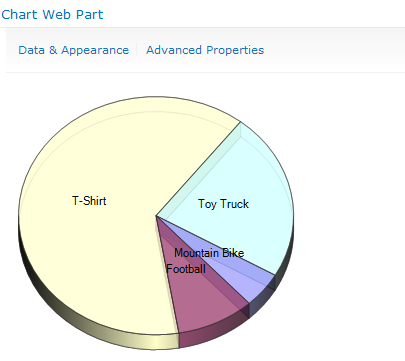
So, what we have here is a chart bound to data coming from a database (via external content type) and a SharePoint list. Pretty cool, right? I think so. It gets better though. What if your boss doesn’t like bar charts? No problem. There are tons of chart types to choose from. Just click on Data & Appearance again and then Customize Your Chart. Look at all of these built in chart types you have.


On the next step, you can further customize the chart you choose. It has some nice pre-built color themes and you can customize the size and what not. It also gives you a live preview as you change settings.

Here is what my new chart looks like.


This adds the chart web part (among other things). Then edit any page and add a Chart Web Part. You can find it under Miscellaneous
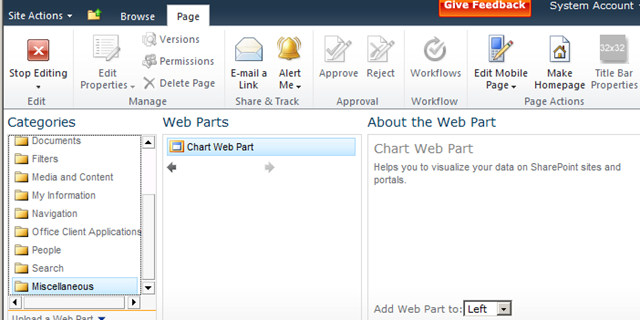
When you add it to the page, it uses some dummy data and displays a simple bar chart.
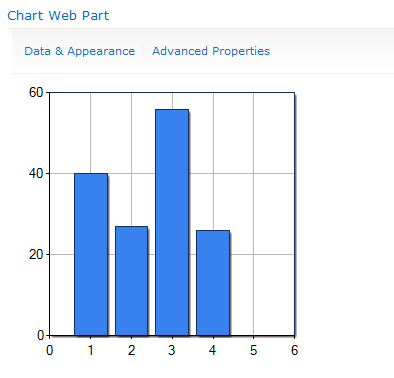
At this point, you might be asking yourself “What kind of data can I bind this to?”. By clicking Data & Appearance, you will see the following screen which leads you to links to customize the appearance or bind to data.
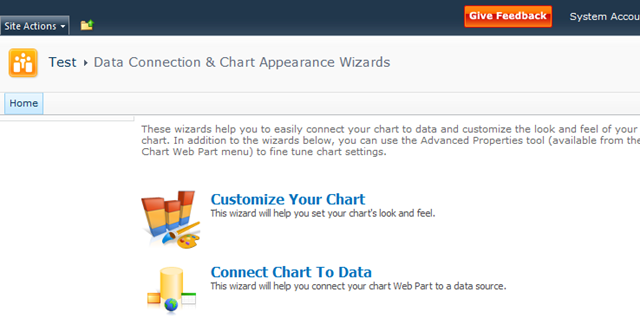
We’ll start by going to Connect Chat To Data. Look at these great options we have to choose from.
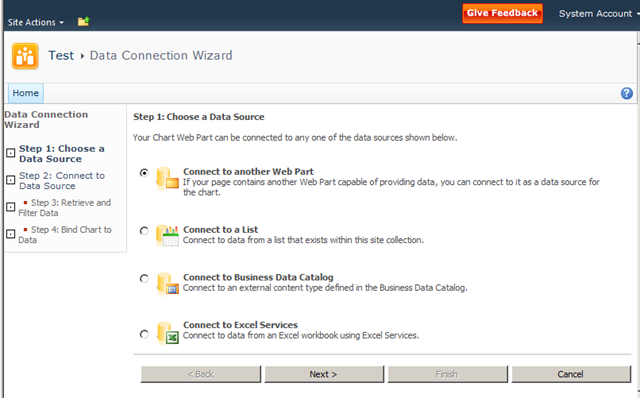
We can connect to another web part, a list, an external content type (looks like they need to update the BDC wording they have there), and to Excel Services.
What I did is I created a new custom list to contain Sales information. I used an External Data field to allow the user to pick a product from the external content type and enter in some sales data in a field.
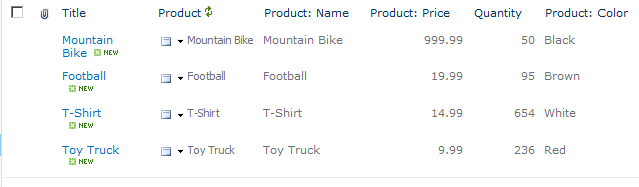
This is the list we are going to use on our chart. On the next step of the wizard, we are allowed to pick a list. Note that it also allows you to choose other sites in the collection as well.
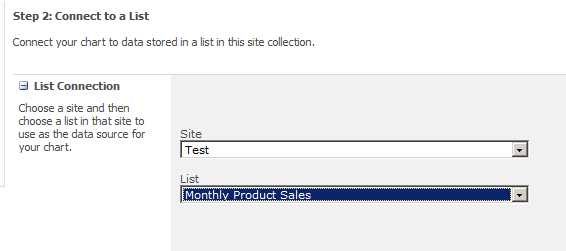
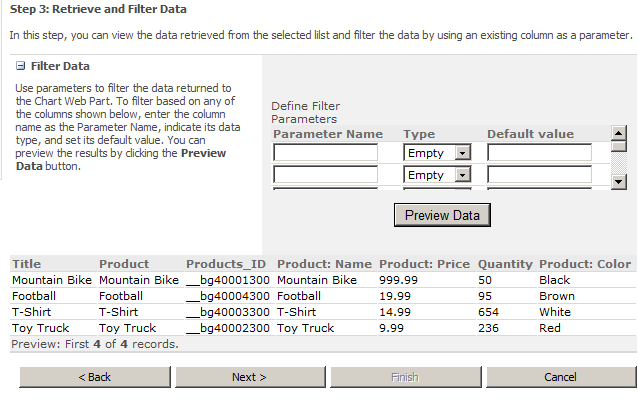
The next step allows you to filter your data first if you are so inclined.
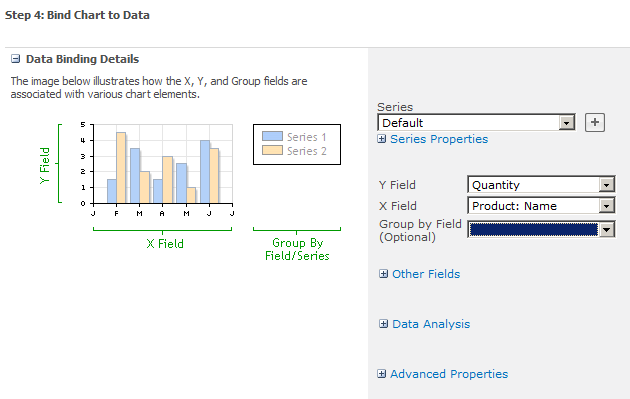
The Chart Web Part has a ton of configurable options. On this last step is where you will start seeing some of them. The main thing to set here is your X and Y fields. You can also specify something to group by as well.
Once you finish this last step, you’ll get something that looks like this.
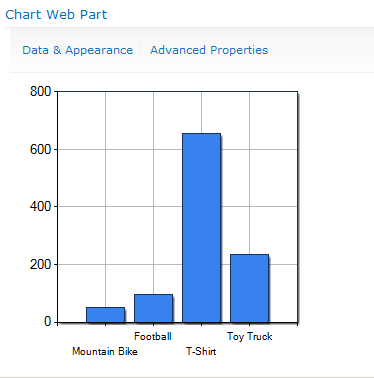
So, what we have here is a chart bound to data coming from a database (via external content type) and a SharePoint list. Pretty cool, right? I think so. It gets better though. What if your boss doesn’t like bar charts? No problem. There are tons of chart types to choose from. Just click on Data & Appearance again and then Customize Your Chart. Look at all of these built in chart types you have.
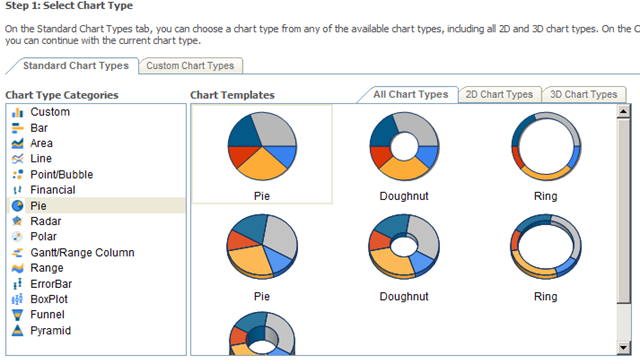
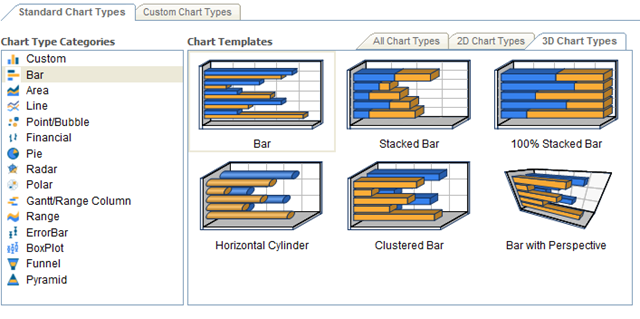
On the next step, you can further customize the chart you choose. It has some nice pre-built color themes and you can customize the size and what not. It also gives you a live preview as you change settings.
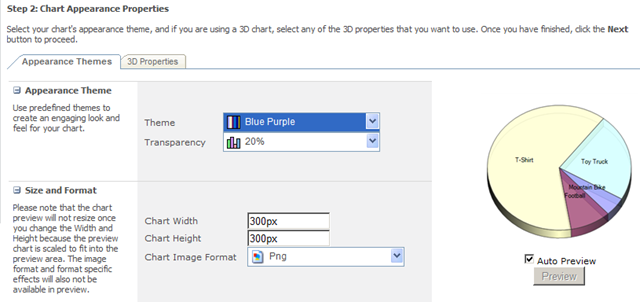
Here is what my new chart looks like.
Thursday, February 9, 2012
Forrester’s latest Wave for Enterprise Social software
Forrester has just published their latest research on Enterprise Social software systems. The Wave chart shown here indicates that Jive, IBM, NewsGator and Telligent lead the list of vendors. You can get the entire report at forrester.com.
In analyzing the top four leaders in the Enterprise Social Software space, Forrester says:

In analyzing the top four leaders in the Enterprise Social Software space, Forrester says:
- Jive SBS: “… continues to drive to establish and lead “social business” as a new software category.”
- IBM Connections: “… continues to move fast and exploit early bets on social. The company is now actively integrating Connections with its broader portfolio — including its portal, content, and business intelligence product lines”
- Telligent Enterprise: “… maintains a razor-sharp focus on analytics, a platform designed from the ground up for extension, and a growing and impressive stable of partners.”
- NewsGator Social Sites 2.0: “…takes SharePoint’s social offering to higher levels through its close partnership with the software giant. “
Saturday, February 4, 2012
What’s NEW in SharePoint 15
Microsoft is, not surprisingly, not commenting. Anyone who is a member of the Technical Preview is, as Hough points out, under non-disclosure. So the answer is: wait and see.
Hough’s post included a thankfully short chunk of standard language: “Office 15 will help people work, collaborate, and communicate smarter and faster than ever before.”
You don’t have to be a rocket scientist to recognize the trends in the market, some of which Hough indicates in his post, including mobile devices, and the blurring of public and private cloud services and on-premise servers and clients.
Social and search are clearly hot, and Microsoft has demonstrated its commitment to investing in these spaces over the years.
Microsoft always works to improve scalability and manageability, and the features of SQL Server 2012 and Windows 8 Server certainly point to significant improvements in those areas, as well as redundancy and recoverability.
You’ve got to assume these features will feed up the “stack” into SharePoint’s capabilities.
There are also rough spots and gaps in functionality in the current versions of the product, and Microsoft has proven over the years that it does recognize many of those and fills them as the products evolve.
So there’s a lot of incredible opportunity for Microsoft to hit it out of the park with Office 15. My hope is that, for the enterprise, the impact of Office 15 could be as significant and valuable as what we’re seeing with the potential of Windows 8 in the client and consumer space.
It’s going to be a very interesting ride, and I look forward to reporting developments to you as Microsoft releases information.
Hough’s post included a thankfully short chunk of standard language: “Office 15 will help people work, collaborate, and communicate smarter and faster than ever before.”
You don’t have to be a rocket scientist to recognize the trends in the market, some of which Hough indicates in his post, including mobile devices, and the blurring of public and private cloud services and on-premise servers and clients.
Social and search are clearly hot, and Microsoft has demonstrated its commitment to investing in these spaces over the years.
Microsoft always works to improve scalability and manageability, and the features of SQL Server 2012 and Windows 8 Server certainly point to significant improvements in those areas, as well as redundancy and recoverability.
You’ve got to assume these features will feed up the “stack” into SharePoint’s capabilities.
There are also rough spots and gaps in functionality in the current versions of the product, and Microsoft has proven over the years that it does recognize many of those and fills them as the products evolve.
So there’s a lot of incredible opportunity for Microsoft to hit it out of the park with Office 15. My hope is that, for the enterprise, the impact of Office 15 could be as significant and valuable as what we’re seeing with the potential of Windows 8 in the client and consumer space.
It’s going to be a very interesting ride, and I look forward to reporting developments to you as Microsoft releases information.
Subscribe to:
Posts (Atom)