

A Share Point of View
Sunday, February 12, 2012

Saturday, February 11, 2012

Large List Throttling over 5000 items in SharePoint 2010
If you are planning to upgrade from SharePoint 2007 to SharePoint 2010 -
you might want to consider your users that have list view lookups of over 5000 items and/or data column lookups of over 8 lookup columns. In SharePoint 2007, it was recommended not to go over 2000 list items to prevent poor performance on your farm.
In SharePoint 2010 throttling is enabled by default (This is configurable however in Central Administration). Throttlng is set to not display list view lookups of 5000 items or lists that have over 8 lookup columns.
The reason for this out of the box throttle is that if you are doing a lookup in SQL on less than 5000 rows, SQL executes a row level lock. If you execute a lookup with over 5000 items SQL executes a table lock which can potential impact all your site collections in that one ContentDB.
Here is a clever a SQL script to help audit your farms for these large lists and over 8 lookup columns - so you can warn your customers if they have any lists that will be throttled after you deploy SharePoint 2010.
you might want to consider your users that have list view lookups of over 5000 items and/or data column lookups of over 8 lookup columns. In SharePoint 2007, it was recommended not to go over 2000 list items to prevent poor performance on your farm.
In SharePoint 2010 throttling is enabled by default (This is configurable however in Central Administration). Throttlng is set to not display list view lookups of 5000 items or lists that have over 8 lookup columns.
The reason for this out of the box throttle is that if you are doing a lookup in SQL on less than 5000 rows, SQL executes a row level lock. If you execute a lookup with over 5000 items SQL executes a table lock which can potential impact all your site collections in that one ContentDB.
Here is a clever a SQL script to help audit your farms for these large lists and over 8 lookup columns - so you can warn your customers if they have any lists that will be throttled after you deploy SharePoint 2010.
SELECT
t3.fullurl [WEBURL],
t1.tp_title [LISTNAME],
COUNT(t1.tp_id) [ITEMCOUNT],
ISNULL(MAX(t4.lookupCount),0) [lookupCount]
FROM DBO.alllists t1
JOIN DBO.alluserdata t2 ON t2.tp_listID = t1.tp_id
JOIN DBO.webs t3 ON t3.id = t1.tp_webid
LEFT JOIN
(
SELECT siteID,listID,COUNT(listID) [lookupCount] FROM dbo.AllLookupRelationships
GROUP BY siteID,listID HAVING COUNT(listID) >= 8
) t4 ON t4.listID = t1.tp_id
WHERE t1.tp_title != 'User Information List'
GROUP BY t1.tp_id,t3.siteid,t3.fullurl,t1.tp_title
HAVING (COUNT(t1.tp_id) >= 5000 OR MAX(t4.lookupCount)>= 8)
ORDER BY 1;
SharePoint 2010 Chart Web Part
To get started, first you need an Enterprise version of SharePoint 2010. Assuming, you do have an Enterprise key, you then need to activate the SharePoint Server Enterprise Site Collection Features.
This adds the chart web part (among other things). Then edit any page and add a Chart Web Part. You can find it under Miscellaneous

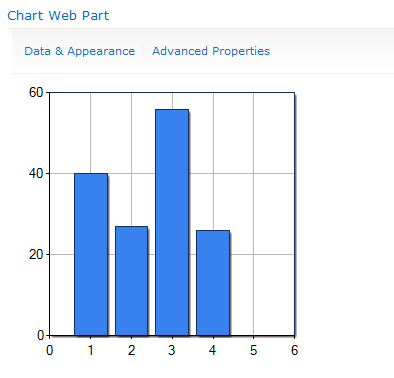
When you add it to the page, it uses some dummy data and displays a simple bar chart.

At this point, you might be asking yourself “What kind of data can I bind this to?”. By clicking Data & Appearance, you will see the following screen which leads you to links to customize the appearance or bind to data.

We’ll start by going to Connect Chat To Data. Look at these great options we have to choose from.

We can connect to another web part, a list, an external content type (looks like they need to update the BDC wording they have there), and to Excel Services.
What I did is I created a new custom list to contain Sales information. I used an External Data field to allow the user to pick a product from the external content type and enter in some sales data in a field.

This is the list we are going to use on our chart. On the next step of the wizard, we are allowed to pick a list. Note that it also allows you to choose other sites in the collection as well.

The next step allows you to filter your data first if you are so inclined.

The Chart Web Part has a ton of configurable options. On this last step is where you will start seeing some of them. The main thing to set here is your X and Y fields. You can also specify something to group by as well.

Once you finish this last step, you’ll get something that looks like this.

So, what we have here is a chart bound to data coming from a database (via external content type) and a SharePoint list. Pretty cool, right? I think so. It gets better though. What if your boss doesn’t like bar charts? No problem. There are tons of chart types to choose from. Just click on Data & Appearance again and then Customize Your Chart. Look at all of these built in chart types you have.


On the next step, you can further customize the chart you choose. It has some nice pre-built color themes and you can customize the size and what not. It also gives you a live preview as you change settings.

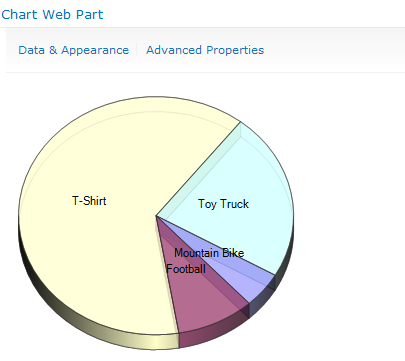
Here is what my new chart looks like.


This adds the chart web part (among other things). Then edit any page and add a Chart Web Part. You can find it under Miscellaneous
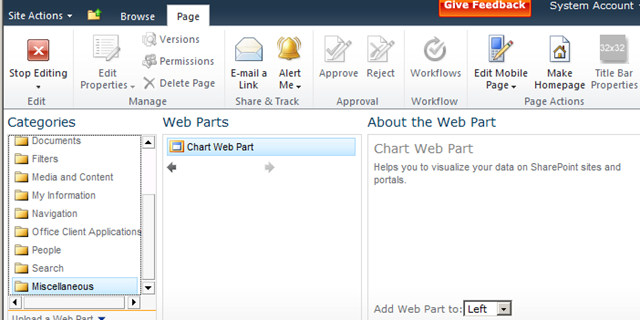
When you add it to the page, it uses some dummy data and displays a simple bar chart.
At this point, you might be asking yourself “What kind of data can I bind this to?”. By clicking Data & Appearance, you will see the following screen which leads you to links to customize the appearance or bind to data.
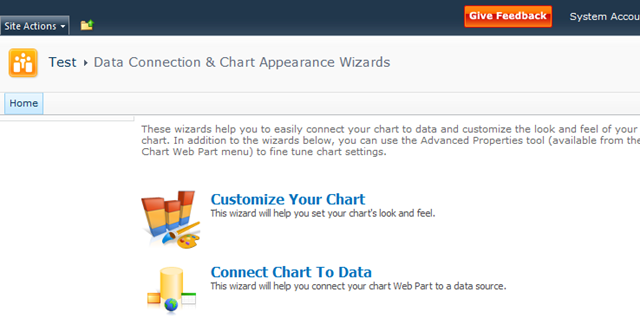
We’ll start by going to Connect Chat To Data. Look at these great options we have to choose from.
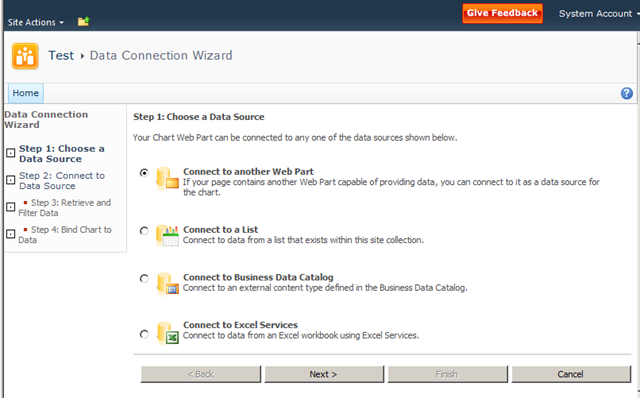
We can connect to another web part, a list, an external content type (looks like they need to update the BDC wording they have there), and to Excel Services.
What I did is I created a new custom list to contain Sales information. I used an External Data field to allow the user to pick a product from the external content type and enter in some sales data in a field.
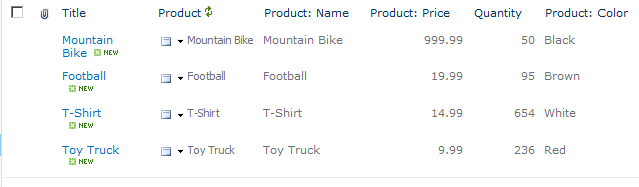
This is the list we are going to use on our chart. On the next step of the wizard, we are allowed to pick a list. Note that it also allows you to choose other sites in the collection as well.
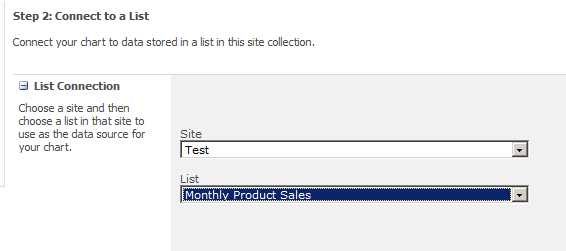
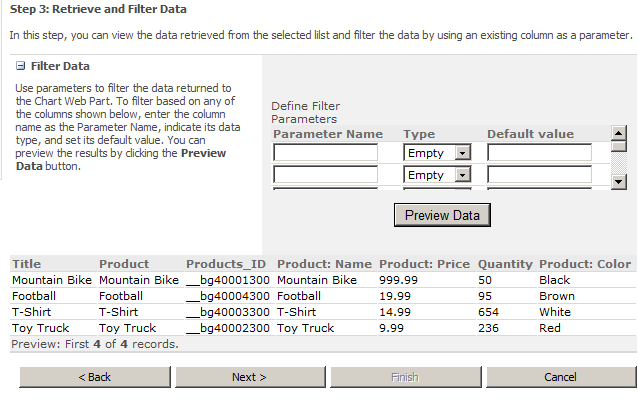
The next step allows you to filter your data first if you are so inclined.
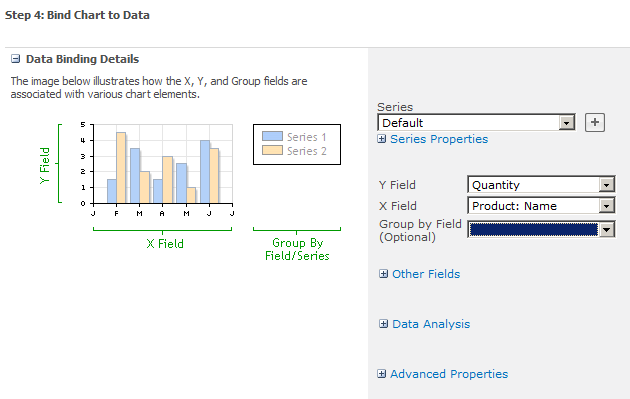
The Chart Web Part has a ton of configurable options. On this last step is where you will start seeing some of them. The main thing to set here is your X and Y fields. You can also specify something to group by as well.
Once you finish this last step, you’ll get something that looks like this.
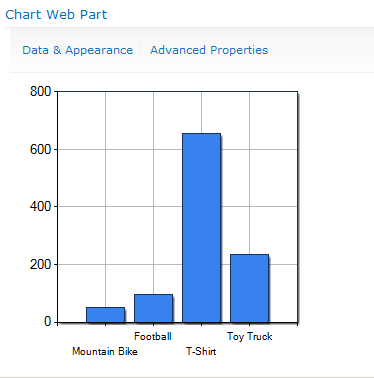
So, what we have here is a chart bound to data coming from a database (via external content type) and a SharePoint list. Pretty cool, right? I think so. It gets better though. What if your boss doesn’t like bar charts? No problem. There are tons of chart types to choose from. Just click on Data & Appearance again and then Customize Your Chart. Look at all of these built in chart types you have.
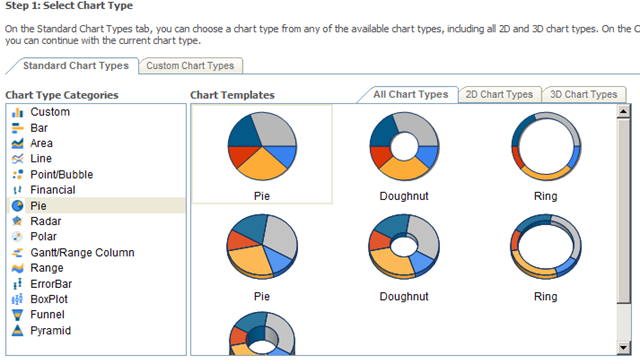
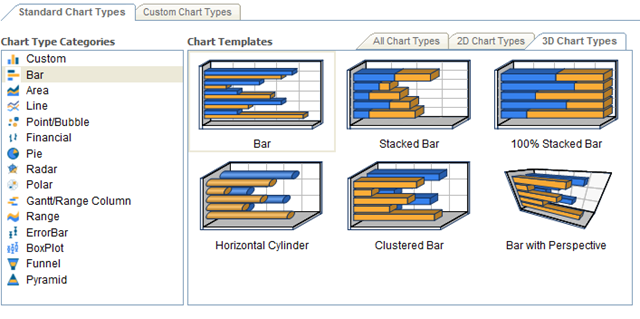
On the next step, you can further customize the chart you choose. It has some nice pre-built color themes and you can customize the size and what not. It also gives you a live preview as you change settings.
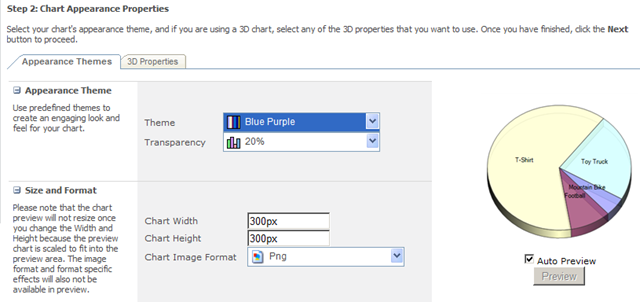
Here is what my new chart looks like.
Thursday, February 9, 2012
Forrester’s latest Wave for Enterprise Social software
Forrester has just published their latest research on Enterprise Social software systems. The Wave chart shown here indicates that Jive, IBM, NewsGator and Telligent lead the list of vendors. You can get the entire report at forrester.com.
In analyzing the top four leaders in the Enterprise Social Software space, Forrester says:

In analyzing the top four leaders in the Enterprise Social Software space, Forrester says:
- Jive SBS: “… continues to drive to establish and lead “social business” as a new software category.”
- IBM Connections: “… continues to move fast and exploit early bets on social. The company is now actively integrating Connections with its broader portfolio — including its portal, content, and business intelligence product lines”
- Telligent Enterprise: “… maintains a razor-sharp focus on analytics, a platform designed from the ground up for extension, and a growing and impressive stable of partners.”
- NewsGator Social Sites 2.0: “…takes SharePoint’s social offering to higher levels through its close partnership with the software giant. “
Saturday, February 4, 2012
What’s NEW in SharePoint 15
Microsoft is, not surprisingly, not commenting. Anyone who is a member of the Technical Preview is, as Hough points out, under non-disclosure. So the answer is: wait and see.
Hough’s post included a thankfully short chunk of standard language: “Office 15 will help people work, collaborate, and communicate smarter and faster than ever before.”
You don’t have to be a rocket scientist to recognize the trends in the market, some of which Hough indicates in his post, including mobile devices, and the blurring of public and private cloud services and on-premise servers and clients.
Social and search are clearly hot, and Microsoft has demonstrated its commitment to investing in these spaces over the years.
Microsoft always works to improve scalability and manageability, and the features of SQL Server 2012 and Windows 8 Server certainly point to significant improvements in those areas, as well as redundancy and recoverability.
You’ve got to assume these features will feed up the “stack” into SharePoint’s capabilities.
There are also rough spots and gaps in functionality in the current versions of the product, and Microsoft has proven over the years that it does recognize many of those and fills them as the products evolve.
So there’s a lot of incredible opportunity for Microsoft to hit it out of the park with Office 15. My hope is that, for the enterprise, the impact of Office 15 could be as significant and valuable as what we’re seeing with the potential of Windows 8 in the client and consumer space.
It’s going to be a very interesting ride, and I look forward to reporting developments to you as Microsoft releases information.
Hough’s post included a thankfully short chunk of standard language: “Office 15 will help people work, collaborate, and communicate smarter and faster than ever before.”
You don’t have to be a rocket scientist to recognize the trends in the market, some of which Hough indicates in his post, including mobile devices, and the blurring of public and private cloud services and on-premise servers and clients.
Social and search are clearly hot, and Microsoft has demonstrated its commitment to investing in these spaces over the years.
Microsoft always works to improve scalability and manageability, and the features of SQL Server 2012 and Windows 8 Server certainly point to significant improvements in those areas, as well as redundancy and recoverability.
You’ve got to assume these features will feed up the “stack” into SharePoint’s capabilities.
There are also rough spots and gaps in functionality in the current versions of the product, and Microsoft has proven over the years that it does recognize many of those and fills them as the products evolve.
So there’s a lot of incredible opportunity for Microsoft to hit it out of the park with Office 15. My hope is that, for the enterprise, the impact of Office 15 could be as significant and valuable as what we’re seeing with the potential of Windows 8 in the client and consumer space.
It’s going to be a very interesting ride, and I look forward to reporting developments to you as Microsoft releases information.
WHEN will Office 15 release?
The Technical Preview milestone means that select customers can access the products now, or very soon. These customers typically have a tight support relationship with Microsoft during the preview.
While most customers will work with the product in non-production environments, my experience has been that some push the envelope and the limits of “bleeding edge.” Either way, when something goes wrong, Microsoft works to understand the problem, to support the customer, and to gain in-the-field experience with customer usage and product performance, to improve the product before releasing it as a public beta.
The Office 14 technical preview launched in July of 2009 and the public beta was announced at the SharePoint Conference and made available in November of 2009. That’s approximately four months of technical preview.
If I were a marketing wiz at Microsoft, I’d look at the calendar and spot TechEd North America and Europe in June—four months away—as a great place to pull back the curtain on such a significant overhaul of Microsoft’s lineup of non-OS products.
Doing the math, and looking at the calendar, I can certainly make educated guesses. I’d expect Microsoft to have ambitious targets, but to maintain its traditional public stance of “it’s ready when it’s ready.” Mary Jo Foley reports that her contacts peg the release by the end of the calendar year.
In any event, it’s clearly going to be in Microsoft’s next fiscal year, which runs July 1, 2012 to June 30, 2013.
It’s also obvious that, regardless of the exact product release date, the SharePoint Conference in Las Vegas will be well enough into the product release cycle to be chock-a-block with Wave 15 information.
HOW can I get my hands on it?
Right now, you cannot, unless you or your company are members of the Technical Preview, which according to Hough is already full. Keep in mind that Technical Preview used to be called Beta 1.The product is not meant to be production ready at this stage, and Microsoft’s goal with the preview is to incorporate customer feedback into the product.
Office 15 Technical Preview
Microsoft announced the launch of the Office 15 Technical Preview on January 30. There’s some big news in the short announcement made on the Office Team Blog. Let’s dissect the announcement and get answers to the questions that I hear from people about the next version of Office and SharePoint.
As announced by PJ Hough, the Corporate Vice President of the Microsoft Office Division, Office 15 reached the Technical Preview milestone on Monday. As word spread like wildfire, the most common questions are these: What’s Office 15? When will it be released? How do I get my hands on it? and, of course, What’s new?
‘Softies regularly refer to this new generation as “Wave 15.” And “wave” might be an understatement: tsunami is more like it. Microsoft’s ambitions are huge, as reported by Hough:
"With Office 15, for the first time ever, we will simultaneously update our cloud services, servers, and mobile and PC clients for Office, Office 365, Exchange, SharePoint, Lync, Project, and Visio."
Read this statement again folks: Microsoft is publicly saying it will update cloud services (Office 365), servers (SharePoint, Exchange and Lync), mobile and PC clients simultaneously. Unified communications (Lync/Exchange), Office apps, and collaboration, all at once. Holy upgrade, Batman! That’s huge!
There had been buzz about Microsoft releasing one side or the other (on-premises versus in the cloud) “first.” You might remember that Office 365 launched a full year after the on-prem version of SharePoint.
Not so this time around. Looks like Microsoft is delivering on its promise to be “all in” with the cloud this time around.
As announced by PJ Hough, the Corporate Vice President of the Microsoft Office Division, Office 15 reached the Technical Preview milestone on Monday. As word spread like wildfire, the most common questions are these: What’s Office 15? When will it be released? How do I get my hands on it? and, of course, What’s new?
WHAT is Office 15?
“Office 15” is the code name for the next versions of Microsoft Office products and services, just as “Office 14” was the code name for what became Office 2010, SharePoint 2010, and Visio 2010. Of course, the name of the product will likely change and I can’t imagine Microsoft straying from the decade-old trend of branding the product with the year—for example “Office 2012” or “Office 2013.” But, for now, it’s “Office 15” and you’ll hear its components referred to with the 15 moniker for coming weeks and months: SharePoint 15, Outlook 15, Visio 15.‘Softies regularly refer to this new generation as “Wave 15.” And “wave” might be an understatement: tsunami is more like it. Microsoft’s ambitions are huge, as reported by Hough:
"With Office 15, for the first time ever, we will simultaneously update our cloud services, servers, and mobile and PC clients for Office, Office 365, Exchange, SharePoint, Lync, Project, and Visio."
Read this statement again folks: Microsoft is publicly saying it will update cloud services (Office 365), servers (SharePoint, Exchange and Lync), mobile and PC clients simultaneously. Unified communications (Lync/Exchange), Office apps, and collaboration, all at once. Holy upgrade, Batman! That’s huge!
There had been buzz about Microsoft releasing one side or the other (on-premises versus in the cloud) “first.” You might remember that Office 365 launched a full year after the on-prem version of SharePoint.
Not so this time around. Looks like Microsoft is delivering on its promise to be “all in” with the cloud this time around.
Friday, February 3, 2012
Subscribe to:
Posts (Atom)